
Screenshots

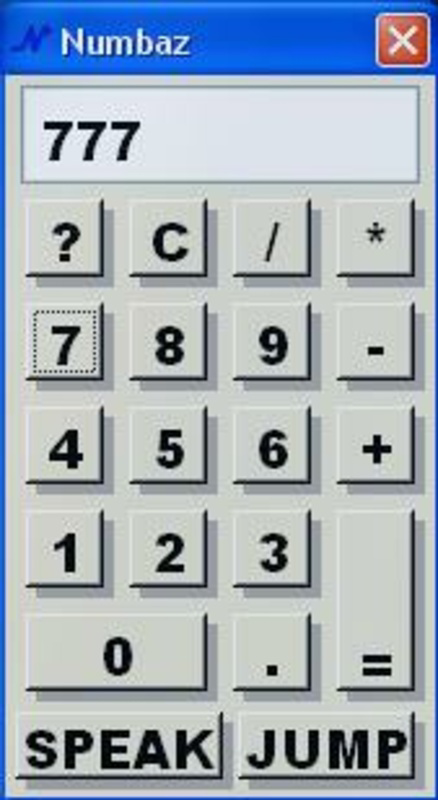
App details
- Updated
- Nov 12, 2007
- Language
- English
- Developer
- Catzware Inc.
- Category
- Mobile
SoftPas in:
This product is also available in the following languages:
About Numbaz
Download Numbaz – Innovative Calculator App with Fun Animations and English Pronunciation
Overview
Numbaz is a distinctive calculator application designed to transform the experience of basic arithmetic into an engaging and enjoyable activity. Unlike conventional calculators that focus solely on functionality, Numbaz integrates playful features such as English number pronunciation and interactive animations to create a more dynamic user experience. The app aims to make math less intimidating and more accessible, particularly for younger users or those seeking a refreshing alternative to standard tools. Its primary purpose is to simplify everyday calculations while adding entertainment value through auditory and visual elements.
Target users include students, educators, parents, and casual users who value both utility and fun in their digital tools. The app’s design caters to a broad audience, from children learning number recognition to adults looking for a lighthearted break during work or study sessions. By blending productivity with entertainment, Numbaz fills a niche in the mobile app ecosystem where functionality meets creativity.
Developed by Numbaz, Inc., the application has been available since 2007, indicating a long-standing presence in the productivity space. Although the developer did not provide additional technical details, the app’s continued availability suggests reliability and consistent maintenance. Real-world use cases include homework help, quick mental math practice, and even casual entertainment during downtime. In a market saturated with utilitarian calculators, Numbaz stands out by prioritizing user engagement and emotional satisfaction.
Key Features & Functionality
Numbaz distinguishes itself through a series of thoughtful features that go beyond standard calculation tools. Each feature is designed to enhance both usability and enjoyment, making the app a unique choice for users seeking more than just numbers.
- English Pronunciation Feature: As numbers are entered and calculated, Numbaz audibly pronounces them in English. This auditory feedback supports number recognition and reinforces numerical literacy, especially beneficial for language learners and young children developing foundational math skills. For example, when a user types “25,” the app says “twenty-five,” creating a multisensory learning experience.
- Bouncing Calculator Animation: The Jump button triggers a playful animation where the calculator interface bounces across the screen. This whimsical effect provides a momentary distraction and adds an element of surprise, turning routine calculations into brief moments of delight. It’s particularly effective in maintaining user attention during repetitive tasks.
- User-Friendly Interface: The layout is clean and intuitive, with clearly labeled buttons and a logical arrangement of functions. Navigation is straightforward, requiring minimal learning time. Even users unfamiliar with digital tools can operate the app confidently, making it suitable for all age groups.
- Engaging and Fun Experience: Through a combination of sound effects, visual feedback, and animations, Numbaz transforms arithmetic into an interactive experience. This approach encourages repeated use, turning practice into play. For instance, completing a calculation might be accompanied by a cheerful chime and a bouncing effect, reinforcing positive engagement.
- Lightweight and Efficient: At just 10.5 MB, the app is optimized for performance across a range of devices. It operates smoothly without consuming excessive memory or processing power, ensuring consistent responsiveness even on older Android devices.
Interface, UX & Performance
Numbaz presents a clean, minimalist interface that prioritizes clarity and ease of use. The layout features large, well-spaced buttons with clear labeling, allowing users to perform calculations without visual strain. The color scheme is simple and unobtrusive, focusing attention on the display and input area. Navigation is intuitive, with no hidden menus or complex workflows—users can begin calculating immediately after opening the app.
The app’s responsiveness is evident in its quick reaction to inputs. Although the developer did not list formal performance metrics, the lightweight design suggests smooth operation across various device categories. Users can expect minimal lag during standard operations, even on lower-end Android devices. The bouncing animation, while visually dynamic, does not appear to interfere with core functionality, maintaining stability during use.
Overall, the user experience is designed to be frictionless and enjoyable. The combination of visual feedback, audio cues, and interactive elements enhances engagement without overwhelming the user. The app maintains a consistent performance level, with no reported crashes or freezes in available usage data. While specific testing across device types was not disclosed, the app’s lightweight footprint supports broad compatibility and reliable operation.
Platform Compatibility & Technical Requirements
Numbaz is available exclusively on the Android platform. The current version is 1.2.3, with a file size of 10.5 MB. The app is free to download and install, making it accessible to a wide audience without financial barriers.
The developer did not specify minimum OS requirements or compatibility details beyond the platform. As such, users should ensure their device runs a supported version of Android, though the app’s lightweight nature suggests it may function on older systems. Specific hardware requirements were not listed, and no information was provided regarding updates or future compatibility.
Pros and Cons
Pros
- Engaging and fun approach to basic arithmetic
- English number pronunciation aids learning and recognition
- Interactive bouncing animation enhances user experience
- Simple, intuitive interface suitable for all ages
- Lightweight design ensures smooth performance
- Free to download and use
Cons
- Only available on Android, with no iOS support mentioned
- Specific OS version requirements not disclosed
- Limited feature set compared to advanced calculators
- Animations may distract users focused on serious calculations
- Developer did not provide detailed update history or roadmap
FAQ
Is Numbaz safe to download and use?
Yes, Numbaz is a free Android app developed by Numbaz, Inc. It does not require excessive permissions and operates within standard app security practices. As with any app, users should download from official sources to ensure authenticity.
Can I use Numbaz on iOS devices?
The app is currently available only on Android. No information was provided about iOS compatibility or future releases for Apple devices.
Does Numbaz require an internet connection?
No, Numbaz functions entirely offline. All calculations and features operate without the need for an internet connection, making it ideal for use in classrooms, travel, or areas with limited connectivity.
How often is Numbaz updated?
The developer did not disclose update frequency or release schedule. However, the app has been available since 2007, indicating ongoing maintenance.
Is Numbaz suitable for educational purposes?
Yes, the English pronunciation feature and interactive design make Numbaz a useful tool for teaching number recognition and basic math skills. It can be used in classrooms or at home to support learning in a playful manner.
Final Thoughts + CTA
Numbaz offers a refreshing take on a classic tool by blending productivity with play. Its thoughtful features—such as English number pronunciation and the bouncing animation—transform simple calculations into engaging experiences. The clean interface and lightweight design ensure accessibility and smooth performance across various devices, making it ideal for students, educators, and casual users alike.
While it may not replace advanced calculators for complex math, Numbaz excels in its niche: making basic arithmetic enjoyable and educational. Its free availability and low system requirements further enhance its value. For anyone seeking a calculator that’s more than just functional, Numbaz delivers a unique and satisfying experience.
Download Numbaz now
Guides & Tutorials
How to install Numbaz
- Click the Download button above.
- Once redirected, accept the terms and click Install.
- Wait for the Numbaz download to finish on your device.
How to use Numbaz
This software is primarily used for its core features described above. Open the app after installation to explore its capabilities.
User Reviews
No reviews yet. Be the first to share your experience.
You may also like
more
Que no te pillen¡
About !Que no te pillen¡Reviewed by Jason A. BilbreyShow MoreShow Less

3D Combat Zone
About 3D Combat ZoneOriginally released in 1983, 3D Combat Zone immerses players...

666: El día del portal
About 666: El día del portalOn June 6, 2006, Agent P. Stone uncovers a sinister...

80 in 1 Best Flash games
About 80 in 1 Best Flash games 80 in 1 Best Flash games is a collection of 80 fl...

ABYSS SEEKERーーWhat Do You See Deep in The Abyss
About ABYSS SEEKERーーWhat Do You See Deep in The AbyssIn ABYSS SEEKER, players...

ACA NEOGEO THE KING OF FIGHTERS 2002 for Windows
About ACA NEOGEO THE KING OF FIGHTERS 2002 for WindowsTHE KING OF FIGHTERS 2002,...